9 Best AI Coding Tools for Developers in 2026
The best coding agent depends on where you work, how much autonomy you want, and what your team needs to control.
AI code generation tools are no longer just autocomplete. The leading products can inspect a repository, edit multiple files, run commands, work through a plan, and return a pull request for review.
That distinction matters for anyone searching for the best AI code generation tool. In 2026, the strongest code generators are broader coding agents, so this guide evaluates the full development workflow rather than output from a single prompt.
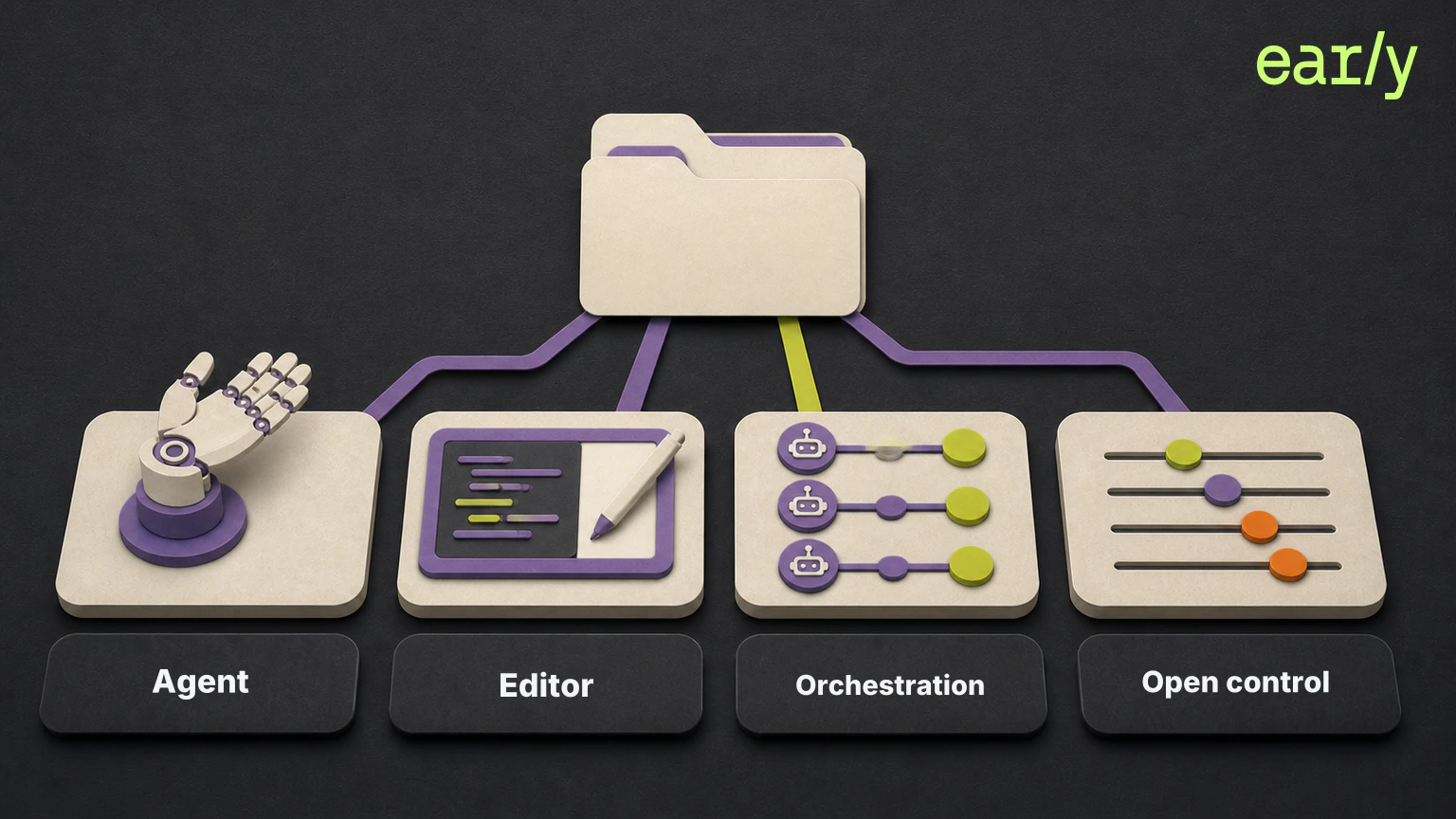
The category has also split into several distinct workflows. Claude Code and OpenAI Codex center on coding agents. Cursor centers on an AI-native editor. Google Antigravity and Devin Desktop focus on orchestrating agents. OpenCode and Cline give developers more open control over models and execution.
That makes the buying question more useful than asking which model writes the best code.
The best AI coding tool is the one that fits where your team works, how much autonomy it wants to delegate, and how much control it needs over models, data, and execution.
This guide compares nine leading AI coding tools for professional developers in 2026. It explains how we selected them, where each one fits, and the tradeoff a team should understand before adopting it.
What Are AI Coding Tools?
AI coding tools use large language models and codebase context to explain, write, edit, refactor, test, or review software from natural language instructions. They can work inside an editor, terminal, browser, cloud workspace, or agent command center.
The strongest products now do more than complete a line. They can:
- Read repository context and project instructions.
- Plan and implement changes across multiple files.
- Run commands, tests, and development tools.
- Create branches, commits, and pull requests.
- Work locally, in a controlled cloud environment, or across both.
- Coordinate several agents on parallel tasks.
That breadth is why the label matters less than the workflow. Two products may both call themselves coding agents while asking developers to work in very different ways.
Quick Comparison
| Tool | Best for | Main workflow | Model choice | Main tradeoff |
|---|---|---|---|---|
| Claude Code | Our overall pick for professional development | Terminal, IDE, desktop, browser | Claude models, with some third-party deployment options | Agent-first workflow is more involved than simple autocomplete |
| OpenAI Codex | Parallel engineering work | ChatGPT, IDE, CLI, cloud workspaces | OpenAI models | Best fit is tied to the OpenAI stack |
| Cursor | AI-native editor workflows | Desktop editor, CLI, web, mobile | Multiple model providers | Requires adopting Cursor as a primary development environment |
| Google Antigravity | Multi-agent orchestration across surfaces | Desktop command center, CLI, IDE | Gemini, Claude, and GPT-OSS models | Teams must choose how its separate surfaces fit their workflow |
| Devin Desktop | Managing local and cloud agents together | Desktop command center and IDE | Devin plus ACP-compatible agents | More operational complexity than a single-agent editor |
| GitHub Copilot | GitHub-centered teams | IDE, GitHub, CLI, cloud agents | Broad model catalog | Capabilities and controls vary by plan and surface |
| OpenCode | Open-source, provider-flexible coding | Terminal, desktop, IDE | Broad provider and local-model support | Quality and cost depend on the selected model provider |
| Cline | Open-source agent control and embedding | IDE, terminal, SDK | Multiple model providers | Setup and permission choices demand more hands-on control |
| Kiro | Spec-driven agentic development | IDE, CLI, web | Claude, OpenAI, and open-weight models | Spec-first work adds structure that quick edits may not need |
How We Selected These Tools
This list focuses on tools built for professional software development rather than prompt-to-app products aimed primarily at non-developers. Lovable, Bolt, Replit Agent, and similar builders can produce working applications, but they solve a different job from coding inside an existing engineering system.
To qualify, a tool needed to be active in 2026 and document support for repository-level or multi-file work. It also needed a distinct reason to choose it, such as editor integration, terminal control, cloud execution, multi-agent orchestration, open-source deployment, model choice, or spec-driven development.
We deliberately limited the comparison to nine tools and favored a strong representative of each distinct workflow over exhaustive coverage. We did not include every model vendor CLI, cloud assistant, or IDE agent when its primary role substantially overlapped with another shortlisted product. An omission does not mean that a tool is inactive or incapable.
We ranked the shortlist using five criteria:
- Workflow fit. Where the tool works and how much process change it requires.
- Context. Whether it can reason beyond the open file and follow project instructions.
- Autonomy. Whether it can plan, edit, run tools, and iterate on a task.
- Control. How teams manage permissions, models, data, and review.
- Team readiness. Whether the product supports repeatable use beyond one developer’s setup.
This is an editorial ranking based on current product capabilities and workflow fit, not a controlled code-quality benchmark. The numbered order reflects our overall judgment across the five criteria, not a precise performance score. Model performance changes too quickly, and several products can run the same underlying models. Product capabilities and plan structures were checked against official sources on August 9, 2026. Each tool name below links to its current official product page or documentation.
What Developer Surveys Show
External developer surveys corroborate the professional adoption of several leading choices and the need to compare workflows, but they do not establish one universal ranking.
A January 2026 JetBrains survey of more than 10,000 professional developers found that 74% had adopted specialized AI developer tools. GitHub Copilot remained the most widely used at work at 29%. Claude Code and Cursor were tied at 18%, with Claude Code showing the fastest adoption growth and the highest satisfaction in that survey. Codex was at 3%, but JetBrains notes that its data was collected before the public desktop launch.
The 2026 Sonar State of Code survey, fielded in October 2025 among 1,149 professional developers who had used AI at work, found that the average development team used four AI tools. Copilot, Claude or Claude Code, Cursor, and Codex all appeared among the tools used for software development. That fragmentation supports choosing by job and workflow instead of expecting one product to fit every team.
The surveys also reinforce the limits of tool selection alone. In the 2025 Stack Overflow Developer Survey, which received more than 49,000 responses, 46% of developers said they did not trust the accuracy of AI output and 45% said debugging AI-generated code was time-consuming. Sonar likewise found that only 48% always checked AI-assisted code before committing it.
These surveys use different samples, dates, and questions, so their percentages should not be compared directly. JetBrains and Sonar also sell developer products. Their findings are useful corroboration for adoption and workflow trends, not independent proof that our exact order is correct.
How to Choose
Start with the development surface your team is willing to adopt.
For a broadly capable coding agent across terminal, editor, desktop, and browser, our first pick is Claude Code. Codex is a close second and can be the better choice for parallel cloud work tied to ChatGPT. For developers who want the agent embedded in a primary editor, start with Cursor.
Teams coordinating several local and cloud agents should compare Google Antigravity with Devin Desktop. GitHub-heavy organizations should keep Copilot on the shortlist because its value includes distribution, governance, and continuity across the GitHub workflow.
For open-source control, compare OpenCode and Cline. Our general-purpose pick is OpenCode across terminal, desktop, and IDE work. Cline is a better fit when the team wants an extensible runtime that can also be embedded through an SDK. If requirements and implementation plans should be explicit before code is written, Kiro offers the clearest spec-driven workflow in this comparison.
Cost structures also differ. Claude Code, Codex, Cursor, Devin Desktop, and GitHub Copilot combine subscriptions with included usage, limits, or metered overages. Google Antigravity has a free individual tier with rate limits plus paid Google AI and organization plans. OpenCode and Cline are open-source runtimes, but connected model providers may charge for usage. Kiro uses a credit-based subscription model. Exact plan terms change frequently, so compare current limits on the official pages before standardizing across a team.
Then evaluate the product on your own repositories. A polished demo does not show how a tool handles your architecture, tests, permissions, build commands, or review standards. Use two or three representative tasks and compare the resulting change, the amount of correction required, and how easy it is to understand what the agent did.
9 Best AI Coding Tools
1. Claude Code
Claude Code is Anthropic’s agentic coding tool for terminal, IDE, desktop, browser, and mobile-connected workflows. It reads a codebase, edits files, runs commands, works with Git, and can coordinate multiple agents.
Best for: Professional developers who want one capable agent across local and remote work.
Why it ranks first: Claude Code combines repository-level work with a coherent set of development surfaces. Project instructions, skills, hooks, background agents, Git workflows, and handoff between local and cloud sessions make it useful beyond one-off code generation.
Tradeoff: Its value comes from an agent-first workflow. Teams looking mainly for lightweight inline suggestions may find an editor-native assistant simpler.
2. OpenAI Codex
OpenAI Codex is a coding agent that works across ChatGPT, IDE extensions, the command line, and cloud workspaces. It is designed for end-to-end engineering tasks such as features, refactors, migrations, and code review.
Best for: Teams that want parallel engineering agents connected to ChatGPT and controlled cloud environments.
Why it ranks second: Codex is especially strong as a command center for concurrent work. Built-in worktrees, cloud environments, project skills, and continuity across ChatGPT, IDE, and CLI make it suitable for delegating several tasks without losing the review path.
Tradeoff: The product is centered on OpenAI models and accounts. Teams committed to broad provider choice may prefer an editor or open-source runtime that can switch model families more freely.
3. Cursor
Cursor is an AI-native development environment that combines direct editing, agents, command-line work, cloud tasks, and mobile access. Its product experience keeps manual coding and delegated implementation in the same environment.
Best for: Developers who want an AI-first editor as their daily development surface.
Why it ranks third: Cursor makes the shift from editing to agent work feel natural. Developers can inspect a repository, edit directly, delegate larger tasks, and review changes without assembling a separate set of tools.
Tradeoff: The benefit depends on adopting Cursor as a primary environment. Teams that want to keep existing editors unchanged may prefer Claude Code, Codex, Copilot, or an open agent runtime.
4. Google Antigravity
Google Antigravity is an agentic development platform with a standalone Antigravity 2.0 command center, a terminal-first CLI, an SDK, and a separate agentic IDE. The command center manages several local agents across projects and workspaces, while the IDE retains browser-aware development and artifact review.
Best for: Developers who want to coordinate several local agents while retaining CLI and IDE options inside one Google-backed platform.
Why it ranks fourth: Antigravity treats agent management as a first-class workflow rather than an extension of chat. Its command center, CLI, IDE, artifacts, and parallel work give it a differentiated place in the shortlist.
Tradeoff: The platform is split across a command center, CLI, SDK, and IDE. Teams need to decide which surfaces belong in their standard workflow, and the product continues to evolve quickly.
5. Devin Desktop
Devin Desktop is the next generation of Windsurf. It combines a full IDE with an agent command center for local and cloud sessions, shared context, pull requests, and ACP-compatible agents.
Best for: Teams that want to manage several agent types while keeping an IDE available for direct inspection and editing.
Why it ranks fifth: Devin Desktop is built around the operational problem of coordinating agent work. Spaces, shared worktrees, local and cloud agents, and ACP support make it useful when a team has moved beyond one agent working on one task.
Tradeoff: That flexibility introduces more concepts than a focused coding agent. Teams need to decide which work runs locally, which runs in the cloud, and which agent owns each job.
6. GitHub Copilot
GitHub Copilot spans code completion, chat, agent workflows, code review, the CLI, GitHub, and major IDEs. Current plans also provide model selection, third-party agents, policy controls, and enterprise governance.
Best for: GitHub-centered organizations that want AI coding inside the platform where they already plan, review, and merge work.
Why it ranks sixth: Copilot’s main advantage is continuity. It can support an individual developer in an editor and an organization managing agents, reviews, policies, and budgets across GitHub.
Tradeoff: The product covers many surfaces, and the available models, agents, controls, and usage vary by plan. Buyers need to compare the exact plan rather than treating Copilot as one fixed feature set.
7. OpenCode
OpenCode is an open-source coding agent available in the terminal, desktop app, and IDE. It supports multiple sessions, many model providers, local models, language-server integration, and project-specific agents.
Best for: Developers who want an open-source agent without tying their workflow to one model company or one editor.
Why it ranks seventh: OpenCode offers a strong balance of openness and daily usability. Its terminal, desktop, and IDE surfaces make it broader than a terminal-only assistant, while provider choice gives teams room to control models and cost.
Tradeoff: Provider choice moves more responsibility to the user. Output quality, privacy terms, rate limits, and cost depend on the models and services connected to the agent.
8. Cline
Cline is an open-source coding-agent runtime for IDE, terminal, and embedded SDK use. It gives developers explicit control over model providers, file edits, command execution, permissions, and extensions.
Best for: Teams that want an open, extensible agent runtime with close control over what the agent can do.
Why it ranks eighth: Cline is more than an editor extension. The CLI and SDK make it useful for teams that want to customize or embed an agent workflow while retaining visibility into actions and approvals.
Tradeoff: The additional control requires configuration. Teams need to choose models, permissions, and operating patterns rather than relying on one tightly managed product experience.
9. Kiro
Kiro is an agentic development environment built around specs, structured tasks, parallel agents, and implementation. It works across IDE, CLI, and web surfaces and supports Claude, OpenAI, and open-weight models.
Best for: Teams that want requirements, design decisions, and implementation tasks documented before an agent writes code.
Why it ranks ninth: Kiro has the clearest opinion about planning. Its spec-driven workflow turns a prompt into requirements, design, and tasks, giving teams a shared artifact instead of leaving the reasoning inside a chat session.
Tradeoff: That structure is useful for substantial work but can add unnecessary process to quick fixes and exploratory changes.
What These Tools Do Not Solve
AI coding tools can increase the amount of change a team produces. They do not make the resulting code self-verifying.
A coding agent can complete the requested task, produce a clean diff, and pass the tests it knows to run. The release can still change behavior outside the task because the affected customer, business, or operational flow was not part of the agent’s working context.
That is why code generation, code review, and release verification remain separate jobs.
- Code generation creates the change.
- Code review evaluates the implementation.
- Release verification checks whether existing behavior still works after the change.
For a deeper explanation, read Verifying AI-Generated Code Is Different From Reviewing It. For the limits of a diff-centered review, see Reviewing the Diff Was Never the Hard Part.
AI Coding Tools FAQ
What are AI coding tools?
AI coding tools use large language models and codebase context to explain, write, edit, refactor, test, or review software from natural language instructions. They can work inside an editor, terminal, browser, cloud workspace, or agent command center.
What is the best AI code generation tool in 2026?
Our editorial pick for most professional development teams is Claude Code because it combines code generation with repository-level work across terminal, IDE, desktop, browser, and multi-agent workflows. OpenAI Codex is a close second and can be the better fit for teams centered on ChatGPT and parallel cloud agents. Cursor is our pick for developers who want an AI-native editor.
Which AI coding tools are open source?
OpenCode and Cline are our open-source picks in this comparison. Both support multiple models and development surfaces. OpenCode emphasizes terminal, desktop, and IDE workflows, while Cline also provides an SDK for embedding its agent runtime.
What is the difference between AI code generation and AI code review?
AI code generation creates or edits code. AI code review evaluates a pull request or diff for implementation quality, security, maintainability, and possible bugs. Teams still need separate evidence that a release preserved the existing behavior their users rely on.