Best AI Code Review Tools in 2026
AI code review checks whether a change is correct. Regression analysis checks what existing behavior the change put at risk.
AI code review tools have changed quickly. In 2024 and 2025, many teams used them as faster PR summarizers: explain the diff, flag obvious bugs, suggest cleaner code. In 2026, the best tools are more serious. They read more repository context, apply team rules, comment directly on pull requests, suggest fixes, and in some cases hand findings back to coding agents.
That progress matters because engineering teams are reviewing more machine-written code than ever. But it also makes the category easier to misunderstand.
AI code review tools review the change in front of them: the pull request, the diff, the task, the implementation, and the requirements attached to that work. They help answer whether new code is correct, secure, maintainable, and aligned with the intended change.
They do not fully answer a different question: what existing production behavior did this change put at risk?
This guide compares the best AI code review tools in 2026, explains what they are built to do, and draws the line between code review and regression analysis. That distinction matters. Code review checks the change. Regression analysis checks the consequences of the change.
What Are AI Code Review Tools?
AI code review tools evaluate source code changes for correctness, security, quality, maintainability, and alignment with pull request requirements. They usually work inside GitHub, GitLab, Bitbucket, an IDE, or a CI/CD workflow. When a developer opens or updates a pull request, the tool analyzes the diff and surrounding repository context, then posts comments, summaries, risk notes, or suggested fixes.
In practical terms, an AI code review tool helps reviewers answer questions like:
- Does this implementation match the task or ticket?
- Did the author miss an edge case in the new code?
- Is there a security, performance, or reliability problem in the changed files?
- Does the PR follow the team’s engineering standards?
- Can the tool suggest a concrete fix for the issue it found?
The strongest tools now go beyond generic suggestions. They use repository context, custom rules, instruction files, pull request history, linked tickets, and sometimes agentic workflows to keep feedback focused on issues that matter.
What AI Code Review Tools Are Not
AI code review is not the same as regression analysis.
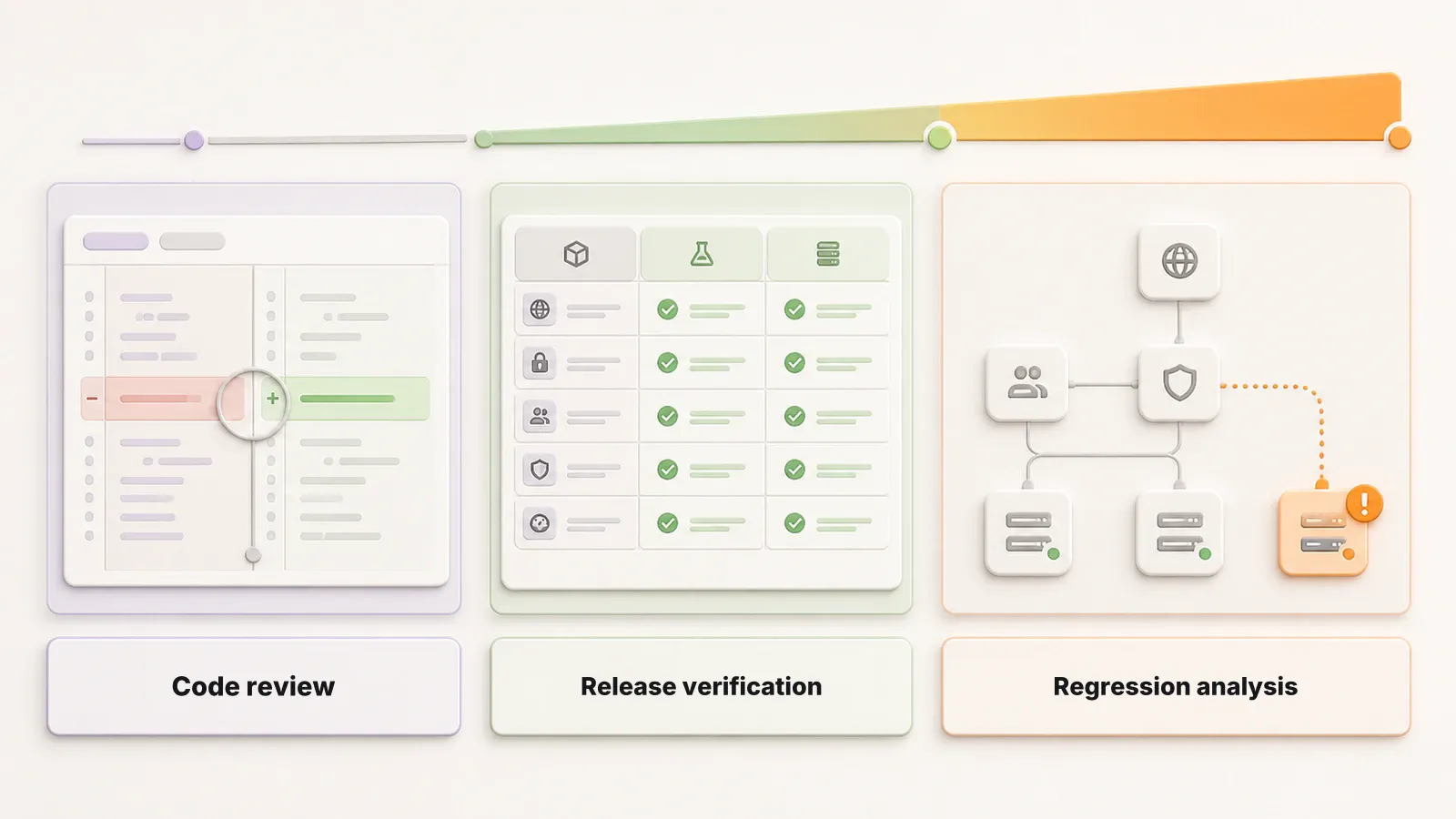
A code review tool is centered on the change: the PR, the feature, the requirement, and the implementation. Even when it uses full-repository context, its primary job is to decide whether the new code looks correct and whether the changed code introduces obvious risk.
A regression analysis tool is centered on existing behavior: the production workflows, customer journeys, and system behavior that already worked before the change. Its job is to ask where a correct-looking change may have broken something outside the immediate diff.
| Question | Best fit | What it checks |
|---|---|---|
| Is this PR implemented correctly? | AI code review | New code, changed files, task fit, security, maintainability, style, edge cases |
| Did this change break existing production functionality? | Regression analysis | Existing behavior, affected flows, downstream impact, release risk |
| Should we merge this change? | Both | Code review checks the implementation. Regression analysis checks what the implementation may have damaged |
This is where many teams get stuck. A pull request can pass human review, pass AI review, and still break a production workflow nobody was looking at. That is not a failure of AI code review. It is a different problem.
For a deeper look at that gap, read Reviewing the Diff Was Never the Hard Part and Verifying AI-generated code is a different job than reviewing it. To compare the tools producing the changes that reach review, see 9 Best AI Coding Tools for Developers in 2026.
Best AI Code Review Tools: Quick Comparison
If you only need the shortlist, here is the 2026 comparison.
The fix depth column is the axis most teams underweight. It says how far a tool goes past telling you something is wrong: comments leave the work with you, suggests gives you a patch to accept, and commits means the tool writes to the branch itself.
| Tool | Best for | Fix depth | Primary workflow |
|---|---|---|---|
| OpenAI Codex | Agentic PR review and follow-up implementation | Implements | GitHub, Codex cloud/app workflows |
| Claude Code Review | Multi-agent codebase-aware pull request review | Comments | GitHub PR comments |
| GitHub Copilot Code Review | Native GitHub first-pass review | Suggests | GitHub pull requests |
| Cursor Bugbot | Fast PR bug detection for Cursor teams | Suggests, autofix via Cursor | GitHub/GitLab PR review and Cursor agent workflows |
| CodeRabbit | Dedicated AI PR review assistant | Comments | GitHub, GitLab, Bitbucket, IDE, CLI |
| Qodo | Rule-driven, context-aware team reviews | Suggests, implements | Git provider integrations |
| Greptile | Graph-based codebase-aware reviews | Suggests, hands off to agents | GitHub/GitLab PR comments |
| Graphite Agent | AI review inside stacked PR workflows | Suggests | Graphite and GitHub |
| Gitar | Agentic review that commits fixes and clears CI | Commits | GitHub, GitLab, Bitbucket, Azure DevOps |
| Devin Review | Understanding and reviewing large complex PRs | Applies from chat | Devin Review webapp and CLI |
| Amazon Q Developer | AWS-native code review and security checks | Suggests | IDE, GitHub, GitLab |
| Bito AI Code Review Agent | Team PR review across major Git providers | Comments | GitHub, GitLab, Bitbucket, IDE |
How We Selected These Tools
This list focuses on tools that can participate directly in a code review workflow in 2026: pull request comments, codebase-aware review, repository rules, suggested fixes, IDE review, or agent handoff. We prioritized current products with documented review workflows over older static-analysis tools, security scanners, and general coding assistants that do not primarily review pull requests.
We also separated code review from regression analysis on purpose. A tool can be excellent at reviewing the changed code and still not answer what existing production behavior the change put at risk.
The list is not ranked. The numbering is for reference only. These tools serve different review surfaces and different team shapes, so a single ordering would be misleading. Read the fix depth column and the “Best for” line rather than the position.
This list was last reviewed in September 2026. The category consolidates quickly, so entries are re-checked against current vendor documentation rather than carried forward.
How to Choose a Review Tool
The best tool depends less on the model and more on which part of the delivery flow you need visibility into.
1. Start with the review surface
If your team lives in GitHub, a native GitHub reviewer may be the lowest-friction choice. If you use GitLab, Bitbucket, Graphite, or a self-hosted setup, support for your actual review surface matters more than a long feature checklist.
2. Check how much context the tool uses
Diff-only feedback is useful but limited. Better tools read surrounding files, repository structure, team rules, instruction files, tickets, and prior review signals. Context is what separates useful findings from generic advice.
3. Look for signal, not comment volume
The wrong AI reviewer creates work. It comments on style, repeats obvious advice, and trains engineers to ignore it. The right reviewer catches issues that change merge decisions.
4. Decide whether you need fixes or findings
Some tools primarily find problems. Others generate suggested patches, commit fixes, or hand work to an agent. Teams adopting AI-generated code should decide how much of the review-to-fix loop they want automated.
5. Do not confuse code review with regression confidence
AI code review can make PR review faster and more consistent. It does not replace regression analysis, test evidence, QA strategy, or release confidence. If your real pain is existing functionality breaking after a clean-looking PR, you need a regression layer as well.
12 Best AI Code Review Tools
1. OpenAI Codex
OpenAI Codex is an agentic coding system that can review pull requests, reason over a codebase, run tests, and help implement follow-up changes. Its code review capability is built for teams that want more than a surface-level summary. Codex can match the stated intent of a PR against the actual diff, reason across dependencies, and validate behavior with execution where the workflow allows it.
Best for: Teams that want code review connected to a broader agentic development workflow.
Standout capabilities:
- PR review through GitHub-connected workflows.
- Reasoning over codebase context and dependencies.
- Ability to move from finding to implementation in the same agentic environment.
- Useful for teams already adopting Codex for development, refactoring, and test work.
Limitations: Codex is most valuable when your repositories, permissions, review triggers, and team workflows are configured carefully. As with any agentic reviewer, teams should define what it should review, when it should run, and which findings require human judgment.
2. Claude Code Review
Claude Code Review is Anthropic’s managed pull request review capability for Claude Code. It uses multiple specialized agents to inspect GitHub pull requests in the context of the full codebase, looking for logic errors, security vulnerabilities, regressions, and broken edge cases. Findings appear as inline comments and can be customized through project instruction files.
Best for: Teams that want codebase-aware, multi-agent PR review inside GitHub.
Standout capabilities:
- Multi-agent analysis of pull requests.
- Inline GitHub comments tagged by severity.
- Support for repository guidance through files such as CLAUDE.md and REVIEW.md.
- Manual and automatic review trigger options.
Limitations: Claude Code Review is still framed around the pull request. It can catch serious issues in the change, but teams still need separate evidence for broader production regression risk.
3. GitHub Copilot Code Review
GitHub Copilot Code Review is the most natural option for teams already reviewing code in GitHub. It provides first-pass review comments, suggestions, and repository-aware feedback directly inside pull requests. Because it lives where many teams already merge code, adoption friction is low.
Best for: GitHub-centric teams that want automated first-pass review on every PR.
Standout capabilities:
- Native GitHub pull request integration.
- Actionable suggestions that developers can apply quickly.
- Repository-grounded review rather than generic best-practice comments.
- Enterprise policy and branch protection compatibility.
Limitations: Copilot Code Review is deliberately shallow. It is a good first pass and a poor last one, and it will not catch a problem that requires reasoning about why the change was made rather than what it changed.
4. Cursor Bugbot
Cursor Bugbot reviews pull requests for bugs, security issues, and code quality problems. It can run automatically on PR updates or manually through commands such as cursor review or bugbot run. For teams already using Cursor, Bugbot fits naturally into the same development loop, with findings that can be opened directly in Cursor or Cursor’s web agents.
Best for: Cursor teams that want fast AI review before or during pull request review.
Standout capabilities:
- Automatic or manual PR reviews.
- Project-specific rules through .cursor/BUGBOT.md.
- Autofix workflows tied to Cursor.
Limitations: Bugbot assumes Cursor. The autofix path and the agent handoff both run through it, so a team standardized on another editor gets a reduced product and should pick a Git-provider-native reviewer instead.
5. CodeRabbit
CodeRabbit is a dedicated AI code review platform focused on pull requests. It summarizes changes, posts detailed review comments, and lets developers chat with the reviewer about findings. It is designed to sit alongside human reviewers and reduce the time spent understanding routine PRs.
Best for: Teams that want a focused AI PR reviewer across common Git workflows.
Standout capabilities:
- Automated PR summaries and review comments.
- Conversational follow-up on code review feedback.
- Support for multiple development surfaces including PRs, IDE, and CLI workflows.
- Clear emphasis on actionable review feedback.
Limitations: CodeRabbit comments rather than patches, so findings still cost a developer the fix. It is also the most talkative reviewer here, which is an advantage on unfamiliar code and a liability on a mature repository until it is tuned.
6. Qodo
Qodo’s code review experience focuses on multi-agent PR review, rule enforcement, and organization-specific quality standards. It is built for teams that need consistency across repositories, not just one-off AI comments. Qodo can analyze pull requests with repository context, pull request history, and defined rules so feedback reflects how the organization actually builds software.
Best for: Teams that want rule-driven AI review aligned with internal engineering standards.
Standout capabilities:
- Multi-agent review architecture.
- Rule system for team and organization standards.
- Pull request summaries, review feedback, labeling, chat, and implementation workflows.
- Support for major Git platforms.
Limitations: Qodo is a platform, not a bot. The rule system is the reason to choose it and also the cost of choosing it, because somebody has to define and maintain those rules. A team that will not invest in that gets a heavier version of a simpler tool.
7. Greptile
Greptile is an AI code review agent that builds a graph of the codebase so it can review pull requests with broader system context. Instead of looking only at isolated files, it maps functions, classes, and dependencies, then posts PR comments with suggested fixes. Greptile also connects findings to external coding agents so developers can route issues into tools like Claude Code, Codex, Cursor, Devin, or other agent environments.
Best for: Teams that want codebase graph context behind AI review comments.
Standout capabilities:
- Repository graph indexing.
- Automatic PR review comments.
- Suggested fixes with paths and line numbers.
- Handoff from review comments into coding agents.
Limitations: The graph describes how the code is wired, not how the product behaves in production. Greptile can trace a call path across the repository and still not know which of those paths a customer depends on.
8. Graphite Agent
Graphite Agent brings AI review into Graphite’s code review platform, which is already known for stacked pull requests and developer workflow tooling. It comments directly on pull requests, focuses on real bugs rather than style noise, and provides suggested fixes for issues it identifies.
Best for: Teams using Graphite for stacked PRs, PR inboxes, merge queues, and review workflow management.
Standout capabilities:
- AI review comments inside the Graphite/GitHub review flow.
- Focus on logic bugs, edge cases, security vulnerabilities, and performance issues.
- Dashboards for review impact and acceptance rates.
- Custom rules and exclusions for team-specific review behavior.
Limitations: Graphite Agent is most compelling as part of the larger Graphite workflow. Teams not using Graphite may prefer a standalone reviewer. Note also that Cursor acquired Graphite in December 2025. Both products still ship separately, but teams comparing Graphite Agent against Cursor Bugbot are now comparing two products from the same company.
9. Gitar
Gitar is an AI-native review agent that goes past commenting. It reviews every pull request, posts inline comments with suggested fixes, and then commits the fix to the branch. It also monitors CI pipelines, performs root cause analysis on failures, and iterates until the build passes. Sonar acquired Gitar in May 2026 and continues to sell it as a standalone product alongside SonarQube.
Best for: Teams that want review findings resolved rather than returned as comments to action later.
Standout capabilities:
- Automatic review of every pull request with inline comments and suggested fixes.
- Fixes committed to the branch instead of left as suggestions.
- CI failure root cause analysis, with iteration until the pipeline is green.
- Configurable pull request lifecycle control, including blocking on issues, approving, and merging.
- GitHub, GitLab, Bitbucket, and Azure DevOps, including self-hosted instances.
- Custom policy enforcement plus Jira, Linear, and Slack integrations.
Limitations: Allowing a tool to commit fixes and manage merges is a significant delegation of authority. Teams should decide which repositories and which classes of finding justify that autonomy before enabling it broadly. The acquisition is also recent, so the long-term relationship between Gitar and SonarQube is still being defined.
10. Devin Review
Devin Review is a code review platform for understanding and reviewing complex pull requests. It organizes large diffs, detects moved or copied code, flags likely bugs, supports codebase-aware chat, and lets reviewers take GitHub workflow actions from the review surface. It is especially useful when the hard part is not just finding a bug, but understanding a large change well enough to review it.
Best for: Teams reviewing large, complex, or agent-generated PRs.
Standout capabilities:
- Smart diff organization.
- Bug catching with confidence levels.
- Codebase-aware chat about the PR.
- Ability to apply code changes from chat back to the PR branch.
- Auto-review options for connected repositories.
Limitations: Devin Review asks the team to move review out of GitHub and into its own surface. That is a real workflow migration, and it is the main reason to rule it out rather than a feature gap.
11. Amazon Q Developer
Amazon Q Developer is now the more relevant AWS-native option for code review. AWS states that Amazon CodeGuru Reviewer entered maintenance mode on November 7, 2025, and recommends Amazon Q Developer for code review and security scanning workflows. Amazon Q Developer can review code in IDEs and GitHub, with findings for security, quality, secrets, and dependency issues.
Best for: AWS-oriented teams that want code review, security checks, and suggested fixes in one workflow.
Standout capabilities:
- Automated GitHub PR review with threaded findings and suggested fixes.
- IDE-based code review for files, diffs, projects, or workspaces.
- SAST, secrets detection, dependency analysis, and code quality findings.
- Suggested fixes that developers can review and commit.
Limitations: Amazon Q Developer is tied to AWS accounts, quotas, and permissions. Outside an AWS-centric organization that setup cost buys little, since the review itself is not differentiated enough to justify the account footprint.
12. Bito AI Code Review Agent
Bito’s AI Code Review Agent reviews pull requests and merge requests across GitHub, GitLab, and Bitbucket. It posts comments inside the PR, uses codebase context, supports custom review rules, and can incorporate signals from static analysis and open source vulnerability tools. Bito also supports IDE-based review workflows for developers who want feedback before opening a PR.
Best for: Teams that need AI PR review across multiple Git providers.
Standout capabilities:
- Automated and manually triggered PR/MR reviews.
- Support for GitHub, GitLab, Bitbucket, and self-managed variants.
- Custom code review rules and guidelines.
- Jira and Confluence context integrations.
- IDE and CLI review options.
Limitations: Bito’s advantage is breadth of Git provider support rather than depth of review. On GitHub alone, the dedicated reviewers in this list generally produce stronger findings, so Bito earns its place when GitLab or Bitbucket coverage is a requirement.
Other Tools to Consider
Not every useful code-quality tool belongs in the main AI code review list. Some tools are better understood as security, static analysis, or developer assistant platforms with AI-assisted review features.
Snyk Code is worth evaluating if your review workflow is primarily about security vulnerabilities and automated fixes. It is especially relevant for teams already using Snyk for dependency, container, and application security.
SonarQube AI CodeFix is relevant for organizations that already rely on SonarQube for static analysis and want AI-generated fix suggestions for supported rules and languages. Sonar acquired Gitar in May 2026, so organizations evaluating Sonar for pull request review should look at Gitar in the main list above rather than at SonarQube alone.
Tabnine is worth considering for teams that want AI code review through CLI, IDE, and GitHub Actions workflows, especially where model control, privacy, or self-hosted options matter.
Where Early Fits
Early does not belong inside the ranked list above because Early is not an AI code review tool.
That distinction is intentional.
AI code review tools check whether a PR, feature, or code change is correct against its task, requirements, and local implementation context. They are strongest when the question is: is this new code good enough to merge?
Early is built for a different question: what existing production functionality did this change put at risk?
That is Regression Intelligence. You can think of it as reviewing a change against the production behavior customers already rely on, not only against the code that changed. The point is not to leave another comment on the diff. The point is to surface where a clean-looking change may break a flow that was working before.
| Layer | Primary question | Best output |
|---|---|---|
| AI code review | Is this change correct? | PR comments, summaries, suggested fixes, security or quality findings |
| Automated tests | Do known checks still pass? | Pass/fail evidence for specified behavior |
| Regression analysis | What existing behavior did this change break or put at risk? | Affected flows, impact analysis, release risk, regression evidence |
Teams need both. AI code review helps them move faster through the PR. Regression analysis helps them avoid shipping a change that looked fine in review but damaged something users already depended on.
If AI coding tools increased your pull request volume, this separation becomes more important. The bottleneck is no longer only writing or reviewing code. It is verifying what changed across the product.
AI Code Review Tools FAQ
What is the best AI code review tool?
For most teams the honest default is GitHub Copilot Code Review, because it reviews every pull request where the team already merges and costs almost nothing to adopt. Choose against that default for a specific reason: pick Claude Code Review or Greptile when reviews keep missing cross-file context, Gitar when you want findings fixed rather than reported, Cursor Bugbot if the team already lives in Cursor, Qodo when review has to enforce shared engineering standards, and Amazon Q Developer when you are AWS-native. CodeRabbit and Bito are the broad choices when you need GitLab or Bitbucket coverage alongside GitHub.
Can AI code review replace human reviewers?
No. AI code review can provide a strong first pass, catch bugs, summarize pull requests, and suggest fixes. Human reviewers still own product judgment, architecture, tradeoffs, accountability, and final approval.
What is the difference between AI code review and static analysis?
Static analysis usually checks code against deterministic rules. AI code review uses language models and repository context to reason about implementation quality, edge cases, intent, and possible bugs. Many modern platforms combine both approaches.
What is the difference between AI code review and regression analysis?
AI code review evaluates the new code in a pull request. Regression analysis evaluates whether that change broke existing functionality. Code review asks whether the implementation is correct. Regression analysis asks what existing production behavior the implementation put at risk.
Do AI code review tools catch security vulnerabilities?
Many do, especially tools such as GitHub Copilot Code Review, Claude Code Review, Codex, Cursor Bugbot, Amazon Q Developer, Snyk Code, SonarQube, Bito, and Qodo. Security-sensitive teams should still combine AI review with SAST, SCA, secrets scanning, threat modeling, and human security review.
Should every pull request get AI review?
For many teams, yes, as long as the review is high-signal and does not block developers with low-value comments. Larger organizations may use different triggers for different repositories, risk levels, or PR sizes.
Code Review vs Regression Analysis
The best AI code review tools in 2026 make pull request review faster, more consistent, and more useful. They summarize changes, catch local bugs, enforce rules, suggest fixes, and help reviewers spend less time on routine inspection.
But the deeper release question is different.
A change can be well written and still break an existing customer workflow. It can satisfy the ticket and still damage behavior outside the changed files. It can pass code review and still create a regression.
That is why code review and regression analysis should be treated as separate layers. Use AI code review to evaluate the PR. Use regression analysis to understand what the PR may have broken.
If your team is shipping more AI-generated code and needs to know what each change puts at risk, book a demo with Early.